
Inside ALTARA
The familiar parts.
Your own way.
Servers and calls get the group together. Personalisation, Spatial Audio and a useful home screen make the space yours.
A little more you.
A lot less default.
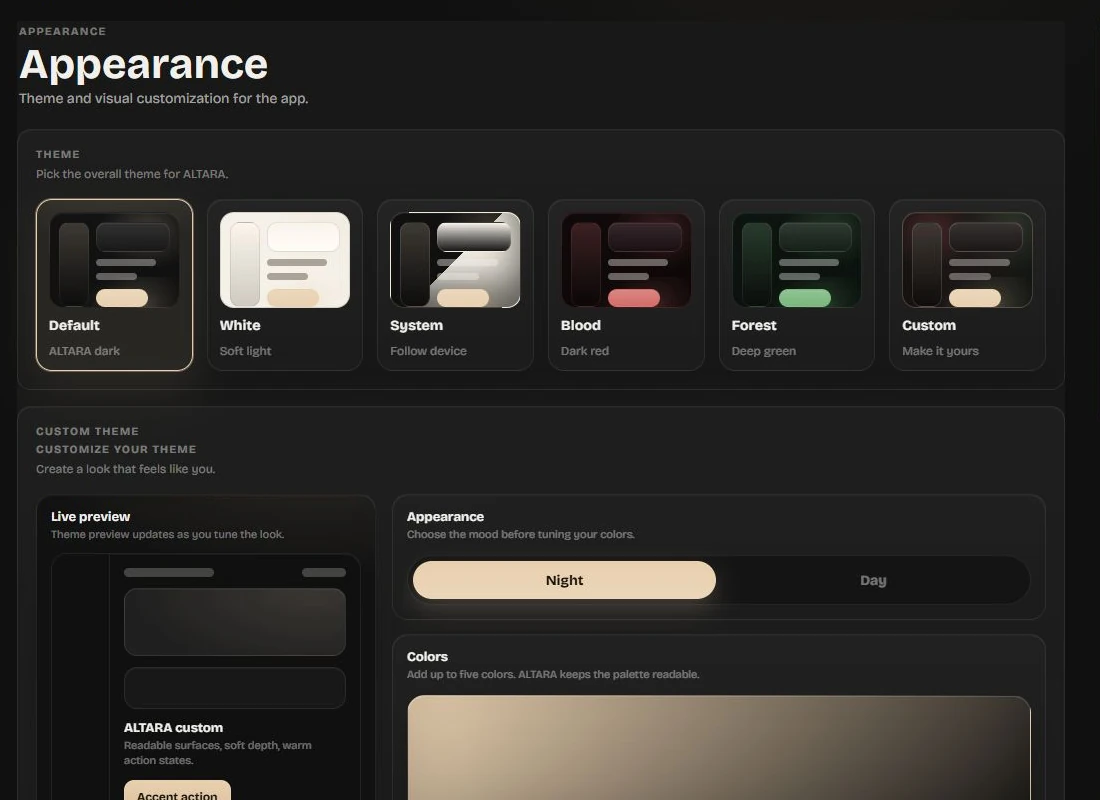
Pick a built-in theme, set your own colours, or explore community themes. The space you spend time in should feel like one you chose.
A home screen with a job to do.
Your conversations have a place. So do the things around them.
Keep a checklist, calendar and notepad on your dashboard. Add a Study Mode timer for a focused session, or explore widgets from the community.
- Calendar, checklist and notes
- Study Mode focus timer
- Community widgets via the Marketplace
Put a little space between voices.
Spatial Audio gives voices a sense of direction in a server call.
Join a server voice channel and switch Spatial Audio on when you want to use it. Basic Spatial Audio is free. Core and Nova add saved-layout capacity for the next time you meet.
- Spatial Audio in server voice channels
- Participant tiles and individual volume controls
- Screen sharing for showing what you are working on
Spatial Audio is available in connected server voice channels, rather than private or group calls.
A place for the whole group.
The channel structure you already understand, ready for your community.
Give each conversation a text channel, gather voice channels into categories, and use roles and permissions to manage who can post, moderate or change the server.
- Text and voice channels with categories
- Roles and permissions
- Reactions, GIFs and file sharing
Take the conversation aside.
Direct messages for a friend. Group DMs for a few of you.
Keep those conversations separate from your servers, with voice calls and screen sharing when typing is not enough. Share images and files up to 25MB on Free; paid plans increase the upload limit.
- One-to-one and group DMs
- Voice calls and screen sharing
- Privacy locks for DMs
Decide when you are available.
Some evenings are for a call. Some are for getting something finished.
Use Focus profiles to control interruptions. Set your presence to online, idle or Do Not Disturb, and keep the people you talk to most in Best Friends.
- Focus and Do Not Disturb
- 3 saved Focus profiles on Free
- Best Friends pins included on every plan
A clear line between free and paid
Find your fit.
Leave room to grow.
Focus profiles, basic Spatial Audio and Best Friends pins are included on Free. Core and Nova add saved profiles and layouts, server capacity, bigger uploads, extra screen sharing modes and a supporter profile badge.
Screen sharing, file transfers and higher usage have ongoing infrastructure costs. ALTARA+ helps cover those costs and keep the service running. Our aim is to keep features free whenever we can offer them without extra running costs for ALTARA.
Free includes screen sharing at 720p60 or 1080p30. Core and Nova both add modes up to 4K60 and native source resolution. Actual quality depends on your device, browser, capture source and connection. Both paid plans have the same sharing modes; Nova adds more server, upload and saved-profile capacity.
- Free
- 3 Focus profiles · Basic Spatial Audio
- 7-day pass · €3.49 once
- 1440p30 · 5 Focus profiles · 3 Spatial layouts
- Core · €8.99/mo
- 10 Focus profiles · 5 Spatial layouts
- Nova · €14.99/mo
- 25 Focus profiles · 15 Spatial layouts
EUR prices for new purchases on desktop and web. Existing subscriptions retain their price. The pass does not renew; its frames, effects and extra capacity last seven days.
Compare plansGive the group somewhere to meet
Find your next hangout.
ALTARA is in open beta. Download the desktop app or open it in your browser, then sign in or create an account.
Linux x64 installers include AppImage and DEB, with a portable tar.gz fallback. Choose a format or read setup help.
Read the release notes · Considering ALTARA as a Discord alternative?